
Built for the Money Monk Google Sheet
The Money Monk Companion add-on
Powers advanced functionality and better multi-year use that break most spreadsheet-based finance tools. Get the best of a personal spreadsheet without paying monthly subscription app charges.
Charts you can't get in a Sheet, customizable themes, multi-currency support, and the ability to seamlessly upgrade the Sheet without starting over.
Included with your one-time purchase. No separate add-on subscription.
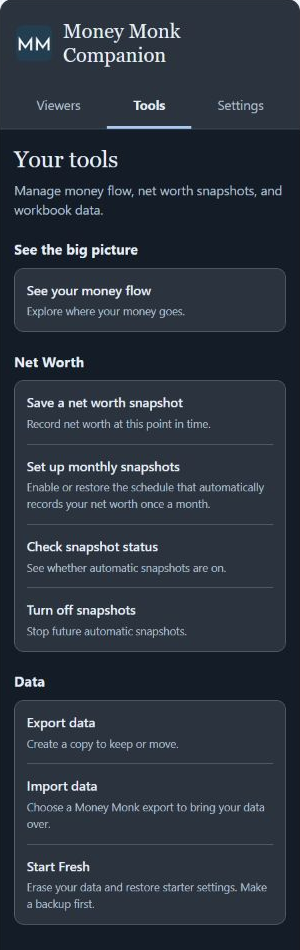
Enhanced spreadsheet functionality. More convenience. No monthly fees.
The add-on fixes weaknesses of spreadsheet-based finance tools and adds app-like experiences, while keeping you in control of your records in your own Google account.
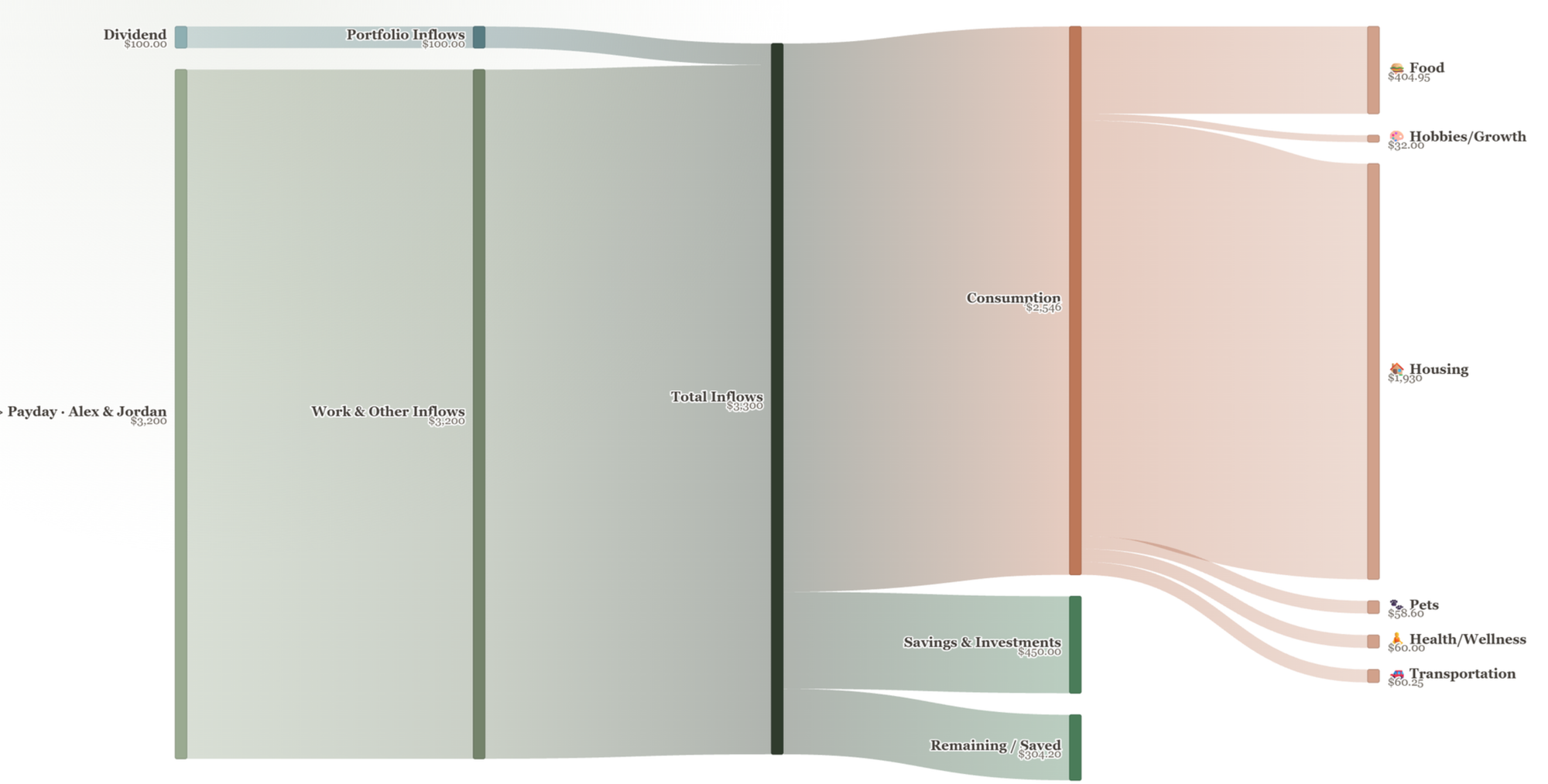
See your money flow
Follow income into spending, savings and investments with a Sankey diagram. Choose a time period to see how the parts of your financial life connect.
Capture net worth over time
Save account values to your net worth history when you choose, or enable monthly snapshots to record them automatically at month-end.
Keep account details in focus
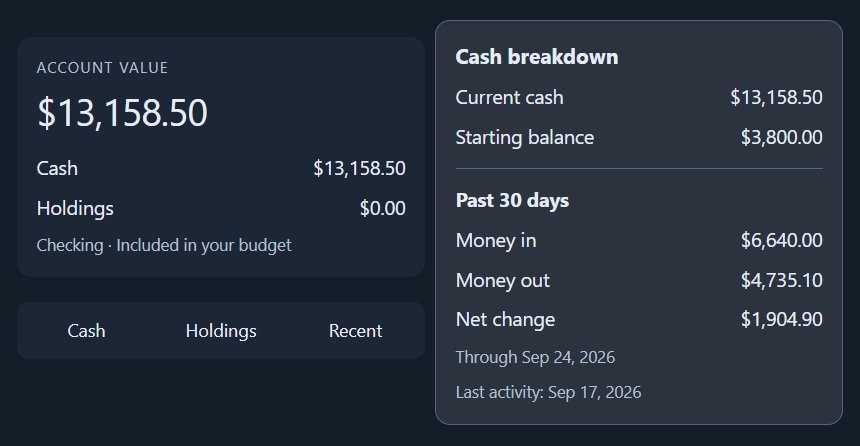
View balances, cash, holdings and recent activity beside your sheet. Switch accounts without leaving the work in front of you.
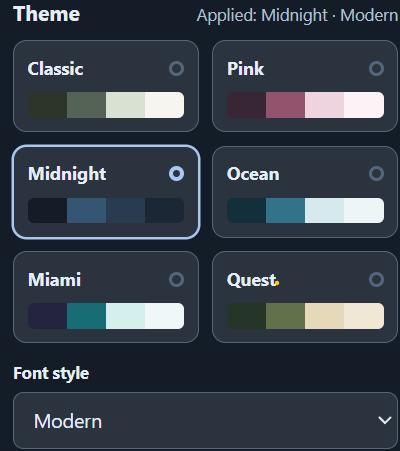
Make the worksheet yours
Choose from six color packs and font styles, with 35 currency formats available at launch. Currency formatting changes how amounts display; it does not convert their values.
Keep or move your records
Export supported records to a separate Google Sheet. Import a Money Monk export into a compatible workbook when you want to move to an updated version.
Start fresh when you need to
Clear your entered data and restore starter settings using Start Fresh. Make an export first if you want to keep a record of your previous work.
Alongside your worksheet
Keep important details in focus
The Viewers tab brings account information into the sidebar so you can check it while you work elsewhere in the workbook.
Choose an account to see its balance, cash breakdown, holdings and recent activity. Refresh the viewer after making changes in your sheet.
The recordkeeping behind the sheet
Why does the worksheet need an add-on?
The companion add-on gives your worksheet the consistent recordkeeping that an app would normally manage in a separate database. Together, the worksheet and add-on let you maintain a connected financial history in your own Google Sheet, without a separate Money Monk database or monthly add-on subscription. You get app-like convenience while keeping control of the workbook that holds your records.
Money Monk is built to hold years of financial records. To keep those records connected, it needs a reliable way to recognize each account, transaction, category and other supported record.
Names and descriptions alone are not reliable identifiers. You can rename an account, reuse a category name or enter two transactions with the same date and amount. Those entries still need to be treated as separate records.
The add-on writes a unique text ID when a qualifying record needs one. The workbook can then use that ID to connect related information, even when the name you see changes.
A simple example
A different name. The same account record.
You enter your information normally. The add-on handles the IDs in the background as you edit. You do not need to create or maintain those IDs yourself.
The workbook and add-on are both required for the full Money Monk system. The add-on is part of the product you purchase, with no additional subscription charge.
Access with a purpose
What Google permissions are needed?
Google asks you to authorize the add-on before it can work with your workbook. Each permission supports a specific part of the product.
Your workbook and export files are stored in your Google account. Google Sheets, Drive and Apps Script process information to run these features. Money Monk does not maintain a separate database of your financial records.
Getting started
You will install the companion add-on through Google as part of setting up your Money Monk workbook.
Install and authorize
Use the setup instructions provided with your purchase. Review Google's permission requests using the explanations above.
Connect your workbook
Open your Money Monk copy and choose Extensions → Money Monk Companion → Open Money Monk. Record IDs are written automatically as you edit.
Choose your preferences
Pick your theme and currency format. Turn on monthly net worth snapshots if you want your history recorded automatically.
Common questions
Can I use the Money Monk sheet without the add-on?
The workbook remains a Google Sheet, but it is not designed to operate as the complete Money Monk system without its companion. Existing values and formulas remain, but new records may be missing the IDs needed to connect them correctly. Sidebar tools and add-on automation also depend on the add-on.
Why not just match records by the names I type?
Names can change, and different records can share the same name, date or amount. A unique ID lets the workbook distinguish those records and keep related information connected without relying on the wording you entered.
Do I need to keep the sidebar open?
No. Record IDs and scheduled snapshots do not depend on keeping the sidebar open. Open it when you want to use a viewer, run a tool or change a setting.
Does the add-on connect to my bank or move money?
No. These tools work with the information in your Money Monk workbook. They do not sign in to your bank or brokerage, transfer money or place trades.
Does an export copy everything in my spreadsheet?
No. The export is designed to carry supported Money Monk records. It is not a complete backup of every worksheet, formula or customization you may have added. Keep your original workbook when moving to a new version and check the imported records before relying on the new copy.
Are currency formats exchange-rate conversions?
No. A currency setting changes how amounts are displayed. It does not translate balances between currencies or apply exchange rates.
What happens if I remove the add-on?
Turn off automatic snapshots before removing it. Your workbook and previously created exports remain in your Google account. Removing or revoking the add-on's access does not itself delete those files or clear all saved settings. The full Money Monk workflow will no longer be available without the add-on.
What if I need help?
Email support@moneymonk.co with what you were trying to do and what happened. Remove personal and financial details from screenshots unless they are needed to explain the problem. Please do not send your full workbook, password or sign-in codes by default.
Included with your Money Monk workbook
The add-on is included with your Money Monk purchase and supports the way the worksheet is designed to work.